Code app
Contractual letter tracking
Register of a large construction project's contractual correspondence, enriched by AI, with reply preparation and deadline tracking.
- Power Apps code app
- React
- TypeScript
- Dataverse
- Power Automate
- Generative AI
Context and problem
On a large construction project, the contractor, the consulting engineer and the owner exchange several hundred contractual letters. Many of them start a reply period, and a missed deadline has contractual consequences.
These letters were filed in the project's document platform, which is built for archiving and offers no way to steer the work: no overview of the replies due, no designated owner, no deadline tracking.
What needed solving
- Know at any time which letters are waiting for a reply, and by when.
- Follow the thread of a topic: which letter answers which.
- Share out the preparation of replies and track their progress.
Solution and key features
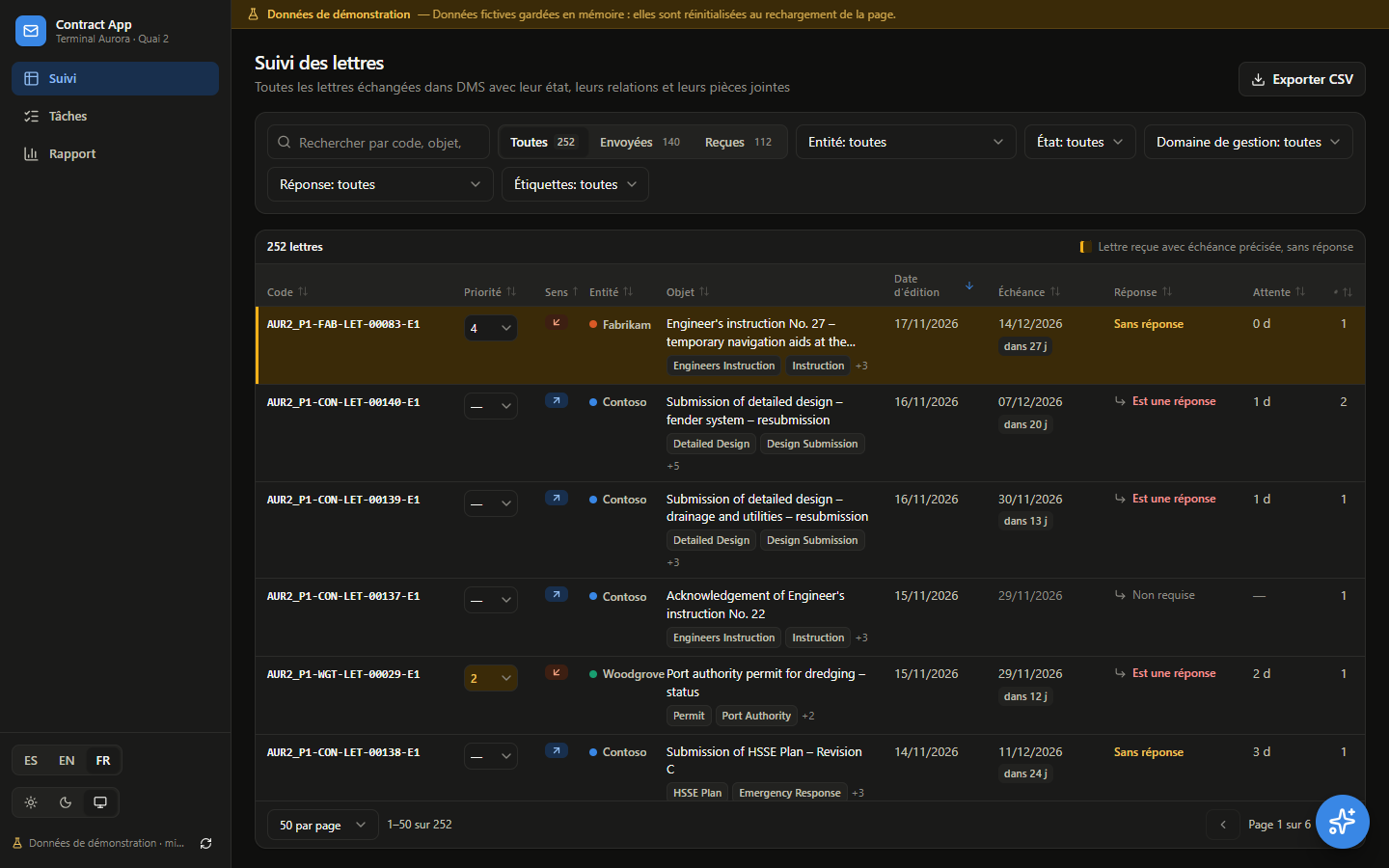
A Power Apps code app (React and TypeScript) gathers every letter in a filterable table. For each one, a language model suggests a summary, tags and an action plan, and the team organises the reply in the same window.
- Sortable, paginated tracking table, filters kept in the page address, CSV export.
- Letter details: AI-generated summary and tags, links to other letters, attachments.
- Computed reply deadline (date requested by the sender, default period, or a date entered by hand) with late letters flagged.
- Reply preparation: owner, status (to prepare, drafting, under review, approved), draft, assigned tasks, log.
- Dashboard: letters sent and received, reply rate and reply times, breakdown by month, entity and topic.
- Interface in Spanish, English and French; light or dark theme.
Demo
The demo loads in this page. No sign-in, no account.
Loading the demo…
The fictional letters are in English, the contract language of the original project, with metadata in Spanish. The interface opens in the language of this page; the app's own selector lets you switch.
Screenshots
Technical choices and results
Data model
- Five Dataverse tables: letters, links between letters, attachments (with the AI analysis), tasks and log, joined by the letter code.
- Columns imported from the document platform stay read-only; the app only writes to its own columns (reply required, deadline, comments, reply status).
Automation
- Power Automate flows import the letters and their attachments, then ask a language model for a summary, tags, an action plan and the requested reply date.
- A weekly email reminds owners of upcoming deadlines.
Technical choices
- Code app instead of canvas app: a table of several hundred rows filtered in the browser, a tabbed window, and instant saves that roll back on failure.
- TanStack Query for data caching and optimistic updates.
- Business logic (letter index, deadlines, indicators) is written as pure functions, independent of the interface.